"I Need Resume Help": How to Move from Blank Page to Hired
Stuck on where to start? Whether it's writer's block or formatting frustration, here is how to use our free tools to build a professional resume or CV today, with practical advice, examples, and optional AI tailoring when you are ready.
1. Help with Formatting: Choose Your Style
The biggest hurdle for most is the "blank page" syndrome. You don't need to be a designer to have a professional-looking CV. We built this resume helper tool to make that first step easier, with 5 distinct, high-quality templates designed to pass ATS (Applicant Tracking Systems) and still convey data in a readable way for recruiters.
Whether you want a modern look, a classic style, or something minimalist, you can switch between templates instantly without re-typing your data. Our templates are single column, and use clear, fonts.
Note: if you choose to use different templates or tools, you should keep these two factors in mind: single column, simple font
If you want inspiration before writing your own resume, you can also browse our resume examples to see how different roles can be structured, what strong bullet points look like, and how real resumes balance clarity with relevance.
A template's job is to make the data clear and accessible. Once that step is done, it's time for the heart of the problem: content.
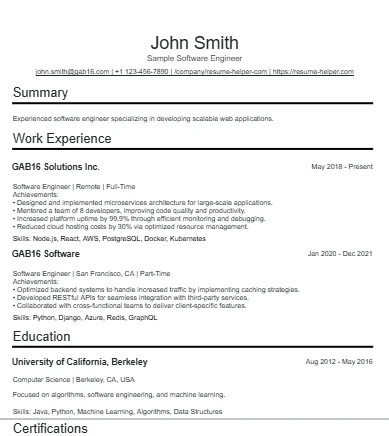
2. Write Strong Resume Bullet Points
If you are thinking "I need resume help because I do not know what to write," start with your bullet points. Recruiters do not hire people based on vague job descriptions like "responsible for support" or "worked on projects". They look for proof of what you did, how well you did it, and why it mattered.
Good resume bullet points are specific, easy to scan, and focused on outcomes. For most roles, they should be short enough to read quickly, but strong enough to show ownership, decision-making, technical skill, and results.
How to write better bullet points
- Lead with a strong action verb: Start each bullet with a clear verb such as built, designed, implemented, improved, reduced, or optimized.
- Show what you actually did: Name the task, project, system, process, or responsibility you owned instead of using vague filler like helped with or worked on.
- Include the result: Whenever possible, mention the outcome, such as faster delivery, fewer errors, higher revenue, lower costs, better customer satisfaction, or improved reliability.
- Use numbers early: If you can quantify the impact, bring the metric closer to the beginning of the bullet so it stands out during a quick scan.
- Keep bullets concise: Aim for one sentence and usually one to two lines. Long bullets are harder to read and often hide the strongest part of the achievement.
- Order bullets by strength: Put the most relevant or impressive bullet first, because many recruiters will only read the first one or two bullets under each role.
- Skip personal pronouns and fluff: Avoid I, we, and empty adjectives like excellent, innovative, or hardworking. Let the accomplishment prove the point.
A simple formula that works
A reliable structure is: action + what you worked on + measurable result. This is similar to common resume frameworks like STAR, XYZ, and CAR, but easier to apply when you are editing bullet points.
For example, instead of writing "Worked on customer support tickets", write "Resolved 40+ customer support tickets per week while maintaining a 96% satisfaction score". Instead of "Helped build internal tools", write "Built internal reporting tools that cut manual weekly admin work by 6 hours".
What recruiters want to see in your bullets
- Technical work: The tools, systems, workflows, or deliverables you handled
- Challenges you solved: Problems you fixed, bottlenecks you reduced, or complexity you managed
- Business or team impact: Time saved, revenue influenced, error reduction, quality improvement, or customer results

3. Exporting Your Resume: PDF & DOCX
Getting "help" shouldn't end with a paywall. Once you've polished your content, you can download your resume in the two most requested formats:
- PDF: Best for preserving your exact layout and design when emailing recruiters.
- DOCX: Perfect if you need to make final manual tweaks in Microsoft Word or Google Docs.
- JSON: Downloading a JSON will allow you to keep your data without saving it to our servers. Whenever you return, you can reupload your file and continue where you left off
4. Your Data, Your Terms
A lot of "free" builders are just data-harvesting machines. ATS Helper is different:
- No Mandatory Sign-Up: You can use the editor and download your resume without even giving us an email address.
- Optional Accounts: Create a free account only if you want to save your progress or use the AI Tailoring tool.
- Local Processing: We prioritize your privacy by keeping your data on our infrastructure.
- No Data "Partners": We don't sell your data.
- No Credit card: We don't ask for credit card info, as we don't need it. We don't charge you for anything.
5. Tailor Your Resume for the Specific Job
Optional: Use AI tailoring once your draft is strong
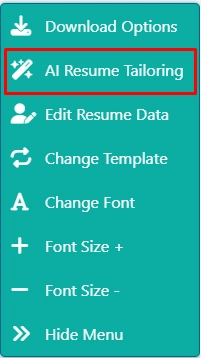
Once you already have a solid draft, our free resume tailoring feature can help you adapt your bullet points and phrasing to a specific job description. This works best after you have already written the basics well, because tailoring is far more effective when there is real substance to improve.
If you want a deeper look at that workflow, visit our AI tailoring feature page.
- Paste the job description: Tell the tool which role you are targeting
- Get rewrite suggestions: It helps align your resume with the language, requirements, and keywords in that posting
- Keep your data private: Our AI runs locally on our servers. Your resume data is not sold and is not used to train outside models
Ready to build?
Stop searching for help and start seeing results. Launch the editor now.