TLDR: ATS friendly means readable, parsable, and low-risk
ATS friendly or ATS-friendly is a real concept that most professionals understand. In simple terms, it means writing and exporting your resume so the text is easy for applicant tracking systems to read, extract, and place into the right categories.
That does not mean every resume has to be plain, ugly, or stripped of personality. It means avoiding formatting choices that create unnecessary parsing risk, especially if the employer uses an older or weaker system.
The most useful definition is this: an ATS-friendly resume is one whose text stays available and understandable to software and to the recruiter who opens it.
ATS friendly meaning, explained
ATS friendly mostly means that the text in your resume is available in a straightforward way to software that needs to read it. The goal is not perfection. The goal is reducing avoidable errors that make the document harder to interpret.
Some common problems include:
- Unusual section names: Many recruiters will still understand creative headings, but some ATS parsers rely on familiar section labels to identify where your work history, education, or skills belong. If you rename standard sections too aggressively, the parser may fail to classify them correctly or may dump that content into a generic block of text. Safer headings include
Work Experience, Professional Experience, or Employment History; Education or Academic Background; Skills, Technical Skills, or Core Skills; Projects or Relevant Projects; and Certifications or Certificates. - Wrong reading order in two-column resumes: A parser may jump between columns in the wrong order, which can scramble your work history or skills.
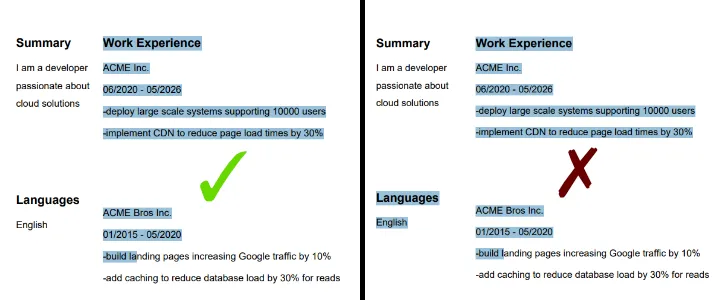
We'll use two files that are intentionally simple so the difference is not visual styling. The problem is the order in which a parser reads the text. The bad-order file can interleave content in a way that makes a resume harder to understand automatically.
To test for yourself, open both files, select all text, and paste it into notepad, or watch how text gets selected.
If you'd rather just have a visual interpretation, check out these screenshots of the two files being selected: in the broken version, the selection order jumps from the work experience section into the languages section, which can make a two-column resume bleed one section into another during parsing.
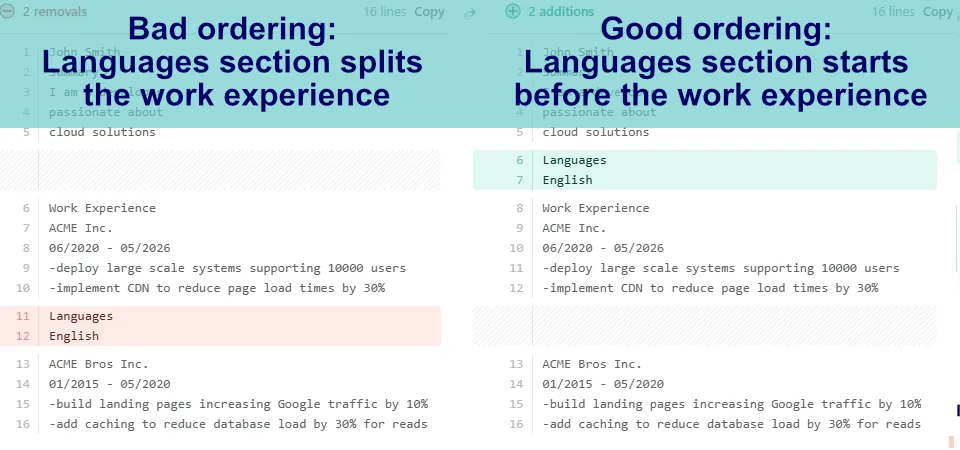
The image below shows a diff check between the extracted text of the two PDFs. It highlights that the visible layout can look nearly identical while the underlying read order still changes enough to confuse a weaker parser.
- Rasterized or image-only PDFs: If the resume looks like a picture instead of selectable text, some systems cannot extract the content properly.
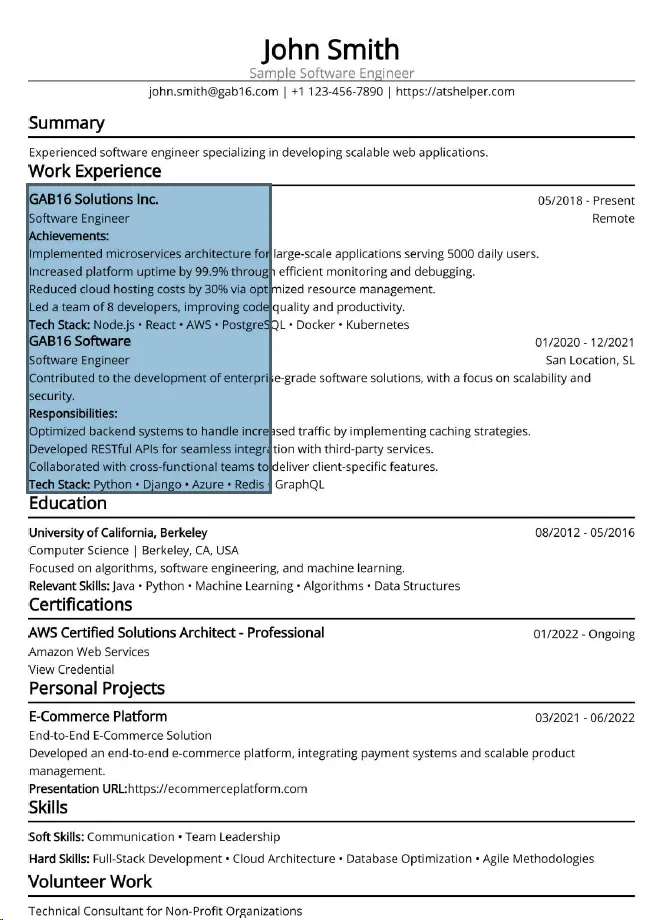
The point here is not visual quality. The point is whether a parser can actually select and extract the resume text.
This screenshot shows what that failure can look like in a PDF reader: the resume appears normal, but text selection behaves like you are dragging across one flat image instead of selecting real words and lines.
- Text errors caused by ligatures: Some fonts or exports turn normal letter pairs like "fi" or "ff" into special combined characters that may copy out incorrectly.
- Text boxes and tables splitting content awkwardly: Dates, job titles, and bullets can end up detached from each other when the layout depends on complex containers. Example: a table-based layout may visually show
Product Analyst | ABC Corp | 2022-2025 on one row, with bullet points underneath. But during parsing, the date column can get separated and dumped much later, leaving output closer to Product Analyst | ABC Corp | Improved reporting accuracy by 18% | 2022-2025. That can make chronology and role context less reliable. - Header and footer text being skipped or misplaced: Contact details placed in those areas can be read inconsistently depending on the parser. Example: if your email, phone number, or portfolio URL sits inside the document footer, one parser may read it correctly, another may move it to the bottom of the extracted text, and another may skip it. That means your most basic contact information can become less dependable than if it were placed in the normal body at the top of the resume.
That does not mean every ATS breaks on every modern template. Many systems are perfectly capable of reading a well-made PDF or even a clean two-column layout. The issue is usually not that resumes must all look identical. The issue is that some templates, export settings, or design choices create avoidable parsing errors.
Just like templates can go wrong, some ATSes are poorly implemented and may have built-in errors, or may have been developed with older technologies and lack capabilities.
You cannot control what ATS the company uses, but you can control your template, your export, and whether your text survives basic parsing checks.
Common ATS-friendly myths that are only half true
A lot of ATS advice online starts from a real concern, then stretches that concern into a rigid rule and can easily develop int o a myth or misinformation.
- An ATS-friendly resume has to look plain, ugly, or stripped of all design: That is not really true. A clean resume can still look polished. The real issue is whether the underlying text remains easy to extract and interpret.
- Every two-column resume will automatically fail: Some two-column resumes parse badly, but some are handled perfectly well by modern systems. The problem is not the existence of two columns by itself. The problem is whether the reading order becomes unreliable, which can either be caused by the template being wrong, or the parser being wrong. Even though it's not an 100% guaranteed failure, we still recommend sticking to one column, but recognize that the issue is not black and white.
- Always use X: Another exaggerated rule is that you must always use one exact file format(such as Word only), one exact font(Arial only), or one exact template style to be safe. In reality, there is no single universal ATS template. There are just design choices that increase or decrease risk. All clean, popular fonts are fine. Word and PDF documents are both great, and some systems may accept other formats as well.
- Resumes must not exceed one page in length: this is false if the reason given is "the ATS cannot handle a longer document" or "the ATS will automatically disqualify long resumes". ATS applications are expressly made to ingest and organize lots of information at once, so they do not choke just because a resume goes past one page.
That said, it is still usually ideal to stay within one page if you have little to no work experience, or only a ballpark of about five years or less of experience, because shorter resumes are often stronger and easier for humans to scan. That is a readability judgment, not proof that the ATS itself cannot process a longer resume. - Don't use PDFs: this is wrong because the Portable Document Format was specifically designed to be "portable", facilitating document transfer between systems while preserving layout, formatting and document appearance. Having them be unfit for resumes would defeat the purpose of PDFs existingn. It is also a very widespread format, so most systems are well adjusted to it.
Where the ATS-friendly marketing gets exaggerated
This is the part many job seekers notice intuitively: some websites market ATS-friendly resumes as if one tiny formatting decision will completely destroy your chances... It may happen for some employers, but that is not the case everywhere.
Fear works well in marketing. If a site can convince people that their current resume is invisible to all ATSes, it becomes much easier to sell a template, a rewrite service, or a checker score. The message shifts from "reduce a few technical risks" to "your resume is doomed unless you buy the fix."
Some of that marketing also treats ATSes as if they all behave the same way. They do not. Different employers use different systems, different configurations, and different workflows. A claim that one exact layout is "the ATS-friendly format" for all jobs should make you skeptical.
The truth is less dramatic. ATS-friendly design matters, but not every resume problem is an ATS problem. Sometimes the issue is weak bullet points, vague experience, bad targeting, or a resume that simply does not match the role well.
That is why the best ATS-friendly advice usually sounds calmer. It focuses on clarity, readable structure, honest keyword alignment, and avoiding known parsing failures rather than trying to scare people into chasing a perfect template.
ATS Friendly Resume: free example
If you want to see what an ATS-friendly resume can look like, start with a couple of our existing free examples. These use the same live ATS Helper preview approach as our dedicated example pages, so you can inspect the actual rendered resume rather than just click through a static card.
John Smith
Business Analytics Student
Austin, TX | john.smith@example.com | +1 512-555-0184 | https://atshelper.com/example
Summary
Analytical university student with hands-on project work in reporting, research, and presentation design. Strong at turning messy information into clear findings and balancing academics with part-time customer-facing work.
Education
The University of Texas at Austin08/2023 - 05/2027
B.S. in Business Analytics | Austin, TX
Coursework focused on statistics, business communication, spreadsheet modeling, and introductory SQL for decision making.
Relevant Skills: Statistics • Excel modeling • SQL fundamentals • Presentation design • Research
Skills
Soft Skills: Written communication • Team collaboration • Time management • Customer service
Hard Skills: Excel • Google Sheets • SQL • PowerPoint • Survey analysis • Data cleanup
Personal Projects
Course Demand Dashboard
09/2024 - 12/2024
Analyzed enrollment and course feedback data to recommend schedule adjustments for high-demand classes.
Presentation URL:https://atshelper.com/example
Student Event Budget Tracker
02/2024 - 04/2024
Built a spreadsheet workflow that helped a student organization track expenses, sponsorships, and reimbursement deadlines more accurately.
Volunteer Work
Peer Resume and Presentation Support
Help classmates tighten slide decks, proofread applications, and practice short presentations before class deliverables.
John Smith
Full Stack Developer
Denver, CO | john.smith@example.com | +1 303-555-0165 | https://atshelper.com/example
Summary
Full stack developer who enjoys turning product ideas into polished releases across frontend, backend, and data layers. Experienced building responsive interfaces, connecting APIs, and shipping features with strong collaboration across design, QA, and product.
Work Experience
ACME Inc.
07/2021 - PresentFull Stack DeveloperDenver, CO
• Built responsive UI flows, improving mobile user retention by 22%.
• Work with product and QA to turn ideas into scoped tasks and smoother launches with 4 week release cycles.
• Improved a key onboarding flow by reducing friction resulting in 30% more successful sign-ups.
• Profile and optimize SQL queries, reworking indexes and cutting query times in half.
Tech Stack: Vue • TypeScript • .NET 8+ • PostgreSQL • REST APIs • GitHub Actions
GAB16 Software
03/2019 - 06/2021Junior Full-Stack DeveloperRemote
• Built a React+.NET internal tool for client management reducing support workload by 5 hours weekly.
• Implemented a background process for log cleanup after 30 days, drastically reducing database costs.
• Improved a React based onboarding flow by reducing friction resulting in 12% more successful sign-ups.
Education
Colorado State University08/2015 - 05/2019
B.S. in Information Systems | Fort Collins, CO
Relevant Skills: Web development • Databases • Systems analysis • UX basics
Personal Projects
Customer Insights Dashboard
01/2024 - 06/2024
Built dashboard pages, API endpoints, and filtering logic that helped customers explore account activity with less support intervention.
Skills
Soft Skills: Cross-functional collaboration • Product thinking • Prioritization • Communication
Hard Skills: Vue • React • TypeScript • .NET • PostgreSQL • REST APIs • Testing
What about ATS score?
ATS score is related to this topic, but it is a different question. ATS friendly meaning is about whether your resume is readable and low-risk for parsing. ATS score usually refers to a number shown by a checker or matching tool, and that number is not a universal standard shared by all applicant tracking systems.
If you want the full breakdown of what ATS score means, why different tools disagree, and whether those scores are worth trusting, read the dedicated article below.
Read: ATS Score Meaning